
Local Processing vs. Cloud Processing in Smart Devices

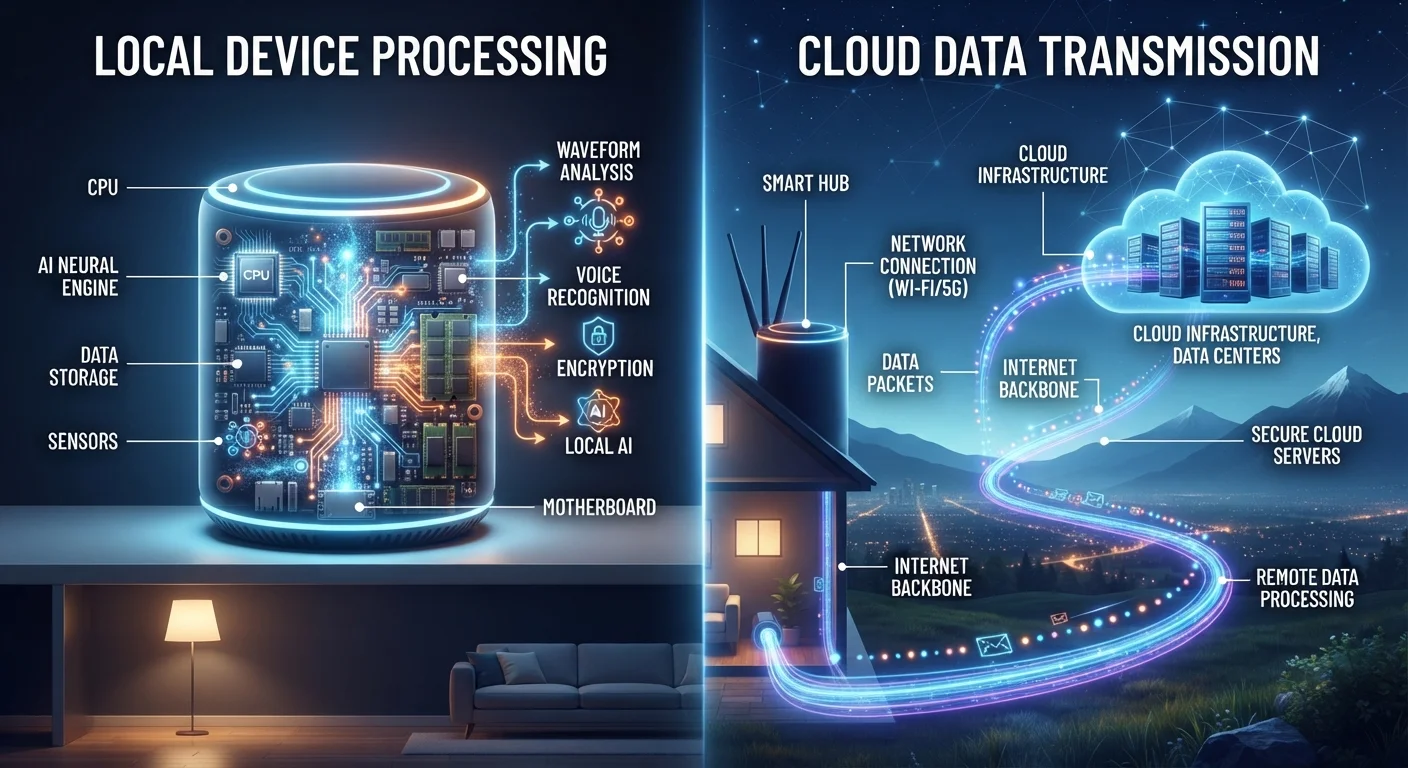
Photo: ScoutAnswers.com | Blogs That Ignite Curiosity editorial
Key Takeaways
- Local processing keeps data on the device itself, reducing latency and network dependency.
- Cloud processing enables more powerful AI features by offloading computation to remote servers.
- Local processing generally offers stronger privacy protection since data rarely leaves the device.
- Cloud-dependent features typically stop working when your internet connection drops.
- Many modern smart devices use a hybrid model, handling simple tasks locally and complex ones in the cloud.
- Your choice of processing model affects speed, privacy, internet reliance, and long-term device value.
What the Terms Actually Mean
Every smart device - a thermostat, doorbell camera, voice assistant, or smart bulb - has to process information to do its job. The question is where that processing happens.
Local processing means the device's own onboard chip handles the computation. Data collected by sensors or microphones is analyzed right there on the hardware, and only the resulting action or a minimal summary may be transmitted elsewhere. Cloud processing means raw or lightly filtered data is sent over the internet to remote servers operated by the device manufacturer or a third-party platform, processed there, and the result is sent back to your device.
Understanding this distinction matters when evaluating any connected device. For a broader look at how these layers fit together, see how the connected home ecosystem works.
| Criterion | Local Processing | Cloud Processing |
|---|---|---|
| Response latency | Very low - no network round-trip | Higher - depends on connection speed |
| Offline functionality | Core features typically work | Most features require active internet |
| Data privacy exposure | Data stays on device or local network | Data sent to and stored on remote servers |
| AI and feature complexity | Limited by onboard chip capability | Access to powerful remote computing |
| Software update dependency | Less frequent, firmware-level updates | Continuous server-side improvements |
| Bandwidth consumption | Minimal ongoing data usage | Ongoing data transmission required |
| Hardware cost | Often higher (more capable onboard chip) | Often lower (offloads work to servers) |
Speed, Reliability, and What Happens Offline
Local processing has a structural speed advantage: there is no network round-trip. When a locally processed device detects motion or hears a wake word, it can respond in milliseconds. Cloud processing introduces latency - however brief - because data must travel to a server and back. On fast home broadband the delay is often imperceptible, but on congested or slow connections it becomes noticeable.
Reliability is where the gap widens. Cloud-dependent devices require a working internet connection for most features. What happens to your smart home when the internet goes down is a practical concern many households discover only after an outage. A locally processed smart lock or thermostat can still operate when the router is offline; a cloud-only counterpart typically cannot.
~50ms
Typical cloud voice assistant round-trip latency
Industry benchmarks for major cloud voice platforms generally put end-to-end response times in the 300-700ms range on broadband, with network transit accounting for a meaningful share.
25%
U.S. households experiencing frequent internet outages
FCC and independent broadband surveys have consistently found that a substantial share of U.S. households report regular service interruptions, underscoring the practical value of local fallback capability.
Privacy: Where Your Data Actually Goes
From a privacy standpoint, the processing location determines exposure. When computation stays on the device, audio clips, video frames, and sensor readings may never leave your home network at all. When data travels to a cloud server, it can be stored, analyzed for product improvement, or - depending on the company's practices - shared with partners.
This does not mean cloud processing is inherently unsafe, but it does mean data is in more places, subject to more potential access points. For a thorough look at these trade-offs, the hidden privacy trade-offs of always-on devices covers what is typically collected and how to manage it. Reviewing a device's privacy policy before purchase remains one of the clearest ways to understand where its processing boundary sits.
How to Check Where a Device Processes Data
Why Many Devices Use Both
A strict local-versus-cloud binary rarely reflects how devices actually work. Most contemporary smart speakers, for example, perform wake-word detection locally - a lightweight task that runs continuously on low-power chips - but route the full voice query to cloud servers for natural language understanding. This hybrid approach balances battery life, privacy, and capability in a practical way.
Similarly, a security camera might analyze a video frame locally to determine whether motion is human-shaped before deciding to upload a clip for cloud-based facial recognition or alert generation. This selective offloading reduces bandwidth consumption and limits unnecessary data transfer.
Knowing whether a device uses a hybrid model, and for which functions, gives you a more accurate picture than the marketing category alone. Common myths about smart home devices addresses several misconceptions that arise from this complexity. As you add more devices, managing a growing fleet of connected devices becomes increasingly relevant to maintaining visibility over where your data is flowing.
The content on this site is for informational purposes only and is not a substitute for professional advice. Always consult a qualified professional for guidance specific to your situation.