
Fiber, Cable, DSL, and Fixed Wireless: What's Actually Different

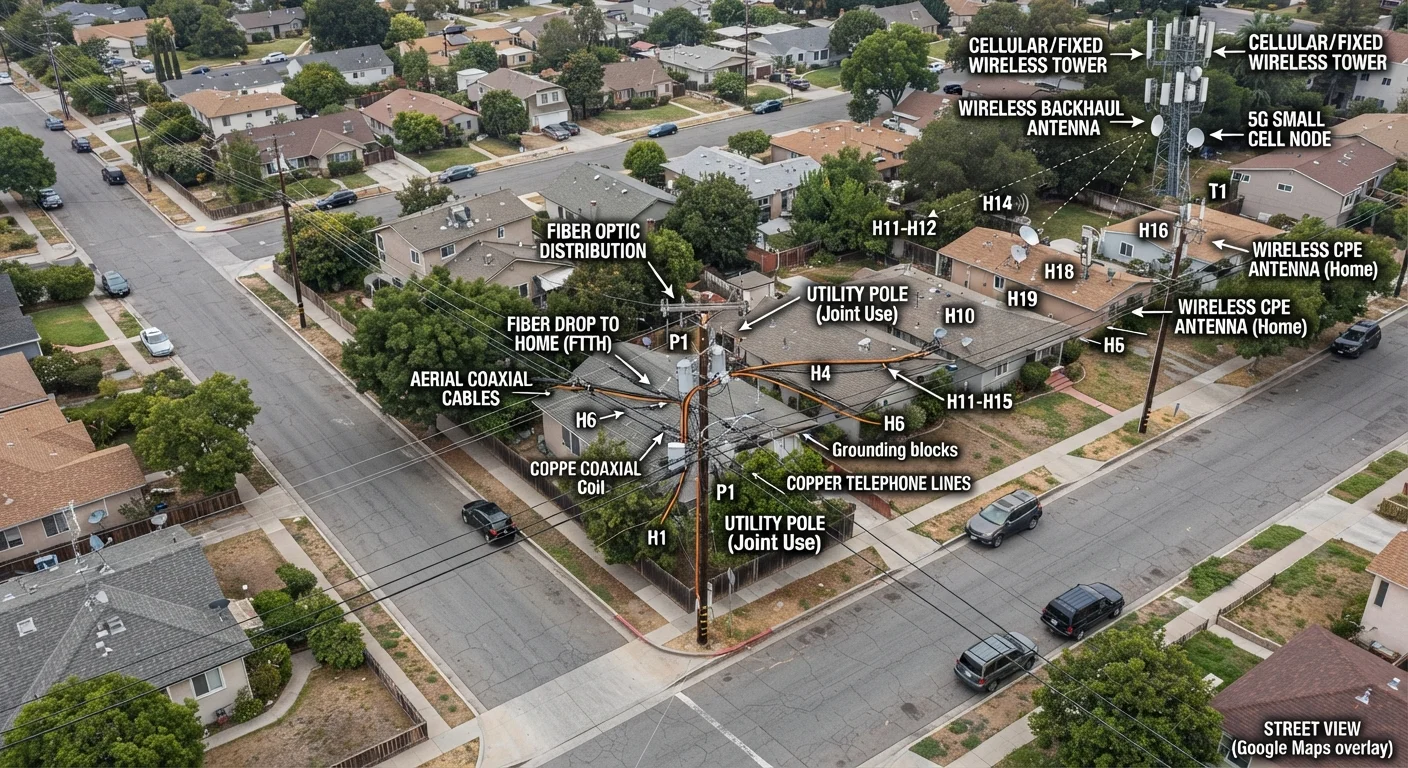
Photo: ScoutAnswers.com | Blogs That Ignite Curiosity editorial
Key Takeaways
- Fiber delivers the fastest, most symmetrical speeds but remains unavailable in many areas.
- Cable is the most widely available high-speed option, though upload speeds lag download speeds.
- DSL uses existing phone lines and is slower, but often the only wired option in rural areas.
- Fixed wireless transmits internet via radio signals and requires a clear line of sight to a tower.
- Each technology involves distinct trade-offs around speed, reliability, availability, and latency.
How Each Technology Delivers Data to Your Home
Before comparing speeds or pricing, it helps to understand what physically carries the data. These four technologies use fundamentally different infrastructure, and that infrastructure shapes every performance characteristic downstream.
Fiber optic transmits data as pulses of light through thin glass or plastic strands. Because light travels at - well, light speed - fiber introduces almost no signal degradation over distance and supports symmetrical upload and download throughput. It requires new cable runs, which is why deployment is still expanding. For a deeper look at where fiber is and isn't available, see the full fiber coverage breakdown.
Cable uses coaxial cable - the same infrastructure that carries cable TV - to deliver internet via radio frequency signals. The DOCSIS (Data Over Cable Service Interface Specification) standard governs how data travels over these lines. Most U.S. cable deployments are hybrid fiber-coaxial (HFC) networks, where fiber runs to a neighborhood node and coax carries the signal the last stretch into homes.
DSL (Digital Subscriber Line) repurposes copper telephone wiring. A DSL modem modulates internet data onto frequencies that don't interfere with voice calls. Signal quality degrades with distance from the provider's central office, so households farther from that equipment typically see slower, less reliable service.
Fixed wireless skips physical cables entirely. A tower broadcasts radio signals - often in licensed spectrum bands - and a receiver mounted on the subscriber's home picks them up. Line of sight to the tower matters significantly; trees, hills, and buildings can reduce signal quality. This technology is expanding rapidly in rural areas. Rural internet options covers this and other alternatives in more depth.
Speed, Latency, and Reliability Compared
| Fiber | Cable | DSL | Fixed Wireless | |
|---|---|---|---|---|
| Typical download speeds | 100 Mbps-1+ Gbps | 25 Mbps-1+ Gbps | 1-100 Mbps | 25-300 Mbps |
| Upload vs. download symmetry | Symmetrical | Asymmetrical (upload lower) | Asymmetrical (upload much lower) | Varies; often asymmetrical |
| Typical latency | 1-10 ms | 10-30 ms | 10-30 ms | 10-30 ms |
| Infrastructure used | Fiber optic cable | Coaxial cable | Copper phone lines | Radio spectrum/tower |
| Geographic availability | Growing; urban/suburban | Broad; urban/suburban | Widest footprint | Expanding in rural areas |
| Weather/interference sensitivity | Very low | Low | Low (distance-sensitive) | Moderate (line of sight) |
| Peak-hour congestion risk | Low | Moderate (shared nodes) | Low | Moderate |
Speed figures vary by provider and plan tier, but the underlying technology sets a ceiling. Fiber plans commonly offer symmetrical gigabit speeds - meaning upload and download rates match - because the medium has abundant bandwidth in both directions. Cable upload speeds are constrained by how the coax spectrum is divided; download capacity is significantly larger than upload under older DOCSIS standards, though DOCSIS 3.1 and the emerging DOCSIS 4.0 narrow that gap somewhat.
DSL throughput is more variable. ADSL (Asymmetric DSL) typically tops out at 25 Mbps download in optimal conditions, while newer VDSL2 can reach 100 Mbps at short distances. Latency on DSL and cable tends to run in the 10-30 millisecond range under normal conditions. Fiber latency is often in the single digits. Fixed wireless latency varies by network design - ground-based fixed wireless often achieves 10-30 ms, distinguishing it from satellite, which carries much higher latency. For context on how satellite internet compares, latency is the key differentiator.
Reliability also differs. Fiber is largely immune to electrical interference and weather-induced signal noise. Cable can experience neighborhood congestion during peak hours because multiple homes share bandwidth on a local node. DSL performance degrades predictably with line length. Fixed wireless can be affected by heavy precipitation and physical obstructions.
~43%
U.S. households with fiber access
According to FCC broadband data, fiber-to-the-premises availability has grown steadily but remains below half of all U.S. locations.
25/3 Mbps
FCC minimum broadband threshold
The FCC historically defined broadband as 25 Mbps download and 3 Mbps upload; the commission has proposed updating this benchmark.
<10 ms
Typical fiber round-trip latency
Industry measurements consistently show fiber delivering lower latency than copper-based or wireless alternatives under normal load conditions.
Availability and Practical Considerations Before You Choose
Technology preference is only useful if the technology is actually available at your address. Fiber reaches roughly 40-50% of U.S. households, concentrated in cities and larger suburbs. Cable infrastructure covers a larger share - particularly in urban and suburban markets. DSL, running over the existing phone network, has the widest theoretical footprint but serves many rural addresses at speeds below the FCC's 25/3 Mbps broadband threshold. Fixed wireless availability depends on tower proximity and local operator deployment.
A few practical factors are worth evaluating beyond raw speed:
- Upload symmetry: Households that frequently upload large files, conduct video calls, or work from home may notice cable's upload limitations more than light streaming users. See what speed numbers actually mean for your household before settling on a tier.
- Equipment: Cable and DSL typically require a modem and router - either rented from the provider or purchased separately. Understanding the difference matters for costs over time. Our modem, router, and gateway explainer breaks this down plainly.
- Installation: Fiber often requires a technician visit and may involve running new cable inside walls or conduit. Cable and DSL activate more quickly if existing wiring is in place. Fixed wireless requires a mounted outdoor receiver, also typically installed by a technician.
- Switching: If you're moving between providers or technologies, timing the transition carefully avoids coverage gaps. Switching internet providers without losing a day of connectivity offers a practical guide to that process.
Once you're connected, verifying that you're receiving the speeds you're paying for is straightforward with the right approach. How to test and interpret your home internet speed explains how to run accurate tests and what the results really indicate.
The content on this site is for informational purposes only and is not a substitute for professional advice. Always consult a qualified professional for guidance specific to your situation.